


💍 19 Ceremony Photos on One Elegant Wedding Scrapbook Layout | CDT Sketchbook Vol. 5

Updated: May 15

Okay. Slide your trimmer over and clear some counter space, because this one is a photo-packed beauty.
This is layout number four in this wedding album series — and yes, we’re using a sketch from Creative Design Team Sketchbook Volume 5 for this one. But don’t worry… we didn’t just follow it. We styled it.
If you’ve been seeing these pages pop up on social media, then you already know the question that keeps coming up:
“How are you fitting that many photos on one layout, and it still looks elegant?”
Valid. Very valid.
Because let’s be honest — most wedding scrapbook layouts either hold one to three giant photos and call it a day… or they shrink everything down so tiny you need reading glasses to find the ring exchange.
When I saw this sketch in the CDT 12x12 Sketchbook, Volume 5, I knew it had the bones to handle a ceremony spread. It had structure. It had balance. And most importantly? It had breathing room.
So we gave the front of the page to the couple — the vows, the glances, the hand squeezes — and tucked the colorful guest chaos underneath with flip flaps.
Big moments stay big.
Extra memories stay included.
And the layout stays cohesive.
So yes… we’re fitting 19 ceremony photos on one layout — and no, it’s not going to look crowded.
Let’s get started!
💍 Materials Used for This Wedding Scrapbook Layout
Here’s everything I used to create this 12x12 wedding scrapbook layout featuring 19 ceremony photos and flip flaps. I’ll break it down by category so you can easily swap pieces if you’d like.
🌿 Patterned & Specialty Paper

NATURE WALK 12" X 12" (30.5 X 30.5 CM) DESIGNER SERIES PAPER 
NATURAL HUES 12" X 12" (30.5 X 30.5 CM) TEXTURED SPECIALTY PAPER 
VELLUM 12" X 12" (30.5 X 30.5 CM) SPECIALTY PAPER
• Stampin’ Up! Nature’s Walk 12” x 12” Designer Series Paper (script pattern + layered strips)
• Stampin’ Up! Natural Hues 12” x 12” (30.5 x 30.5 cm) Textured Specialty Paper (gold strip across the layout)
• Stampin’ Up! Vellum 12" x 12" Specialty Paper (layered strip detail)

Cardstock
• Stampin’ Up! Early Espresso Two-Tone 12” x 12” Cardstock (base, torn element, bottom strip, photo mats)
• Stampin’ Up! Golden Glow Two-Tone 12” x 12” Cardstock (title + layered accents)
• Stampin’ Up! Mossy Meadow Two-Tone 12x12 Cardstock (leaves)
• Stampin’ Up! Basic White 8-1/2 x 11" Cardstock (photo mats, flowers, sprigs)
Embellishments
• Stampin’ Up! Antique Pearls— the perfect tiny accents for flower centers and the poinsettia sprigs.
• Stampin’ Up! Flip Flaps - Make your scrapbooks fun and interactive with the 3" x 3" (7.6 x 7.6 cm) Flip Flaps!
Stamp & Die Bundles
Stampin' Up! Poinsetta Petals Bundle CTMH Secret Garden Dies 
HELP ME GROW BUNDLE (ENGLISH)
• Stampin’ Up! Helped Me Grow Bundle (leaves)
• Close To My Heart Secret Garden Dies (sold by Stampin’ Up!) – flowers
• Stampin’ Up! Poinsettia Petals Bundle – sprigs

Tools
• Stampin’ Up! Paper Trimmer— used for every straight cut on the layout: DSP panels, photo mats, vellum strips, and those long horizontal bands.
• Stampin’ Up! Cut & Emboss Machine—floral piece, sprig, and leaf used in the bouquet clusters.
• Stampin’ Up! Take Your Pick - Multipurpose pickup and precision tool with tacky putty end easily picks up sequins, paper accents, and other small objects.
(*As an Amazon Associate, I earn from qualifying purchases.)

Printers - Embellishment & Photo
• Canon TS9521C Crafting Printer — used for printed journaling pieces, print-then-cut embellishments & titles
• Epson PictureMate PM-400 Wireless Compact Color Photo Printer, white — compact wireless printer makes it easy to print beautiful 4" X 6" And 5" X 7" Photos that will last
printer ink refills
💡 A Quick Note About This Sketch

Since this layout was inspired by a sketch from Creative Design Team Sketchbook Volume 5, I won’t be sharing exact cut measurements for this one.
If you’ve followed my blog for a while, you know I normally include detailed measurements in my step-by-step tutorials. This page is a little different because we’re working directly from a published sketch design.
That said, I’m walking you through every design decision, layering choice, and technique I used so you can confidently recreate it with your own photos.
If you’d like to grab the Creative Design Team 12x12 Sketchbook, Volume 5 for yourself, you can find it here:
STEP ONE: Follow the Sketch… Then Make It Yours

Because yes — this started exactly as the CDT sketch.
I laid down the strips just like the sketch showed. Clean. Structured. Everything behaving.
And then… I changed it.
The original design had a solid strip across the top. Once it was glued down, I realized I wanted more texture and more movement. Instead of starting over (absolutely not), I layered a torn strip of Early Espresso Two-Tone Cardstock right over it.
Was it slightly wider than planned? Yes.
Would I maybe trim it down if I could rewind time? Probably.
Did it give the layout personality? Absolutely.
The sketch gave us the structure. But....

The torn edge gave it soul.
Underneath that, we built out the foundation:
• Early Espresso base (dark side for depth)
• Nature’s Walk script across both pages
• Natural Hues textured gold strip
• Vellum for softness
• Coordinating cardstock layers grounding the bottom
💡 Pro Tip: A sketch is a starting point, not a contract. If your design evolves mid-glue-stick, let it.
STEP TWO: Frame the Moments That Matter

Now that the base was set, it was time to place the ceremony photos — and this is where this wedding scrapbook layout really earns its elegance.
Every photo is double-matted in Early Espresso and Basic White, and that combination is doing more work than people realize. The Early Espresso grounds the images. The Basic White keeps them crisp.
With 19 ceremony photos on one 12x12 scrapbook page, the matting becomes part of the design strategy. Without those layers, this could have felt busy fast. Instead? It feels structured.

When you’re working with a high photo count layout — especially in a wedding album — cohesion is everything.
So I kept every visible photo focused on the couple. The vows. The expressions. The quiet in-between moments. That keeps the color story controlled and the page feeling calm.
The guest photos? They’re still here.
They’re just tucked underneath. And that’s where the Flip Flaps quietly start doing their thing.
💡 Pro Tip: When designing a ceremony scrapbook layout with many photos, decide which images carry the visual weight. Keep those on top. Let the rest support the story without competing for attention.
STEP THREE: How to Install Flip Flaps (Without Overthinking It)

Flip flaps are the secret weapon for high-photo-count scrapbook layouts. They let you keep your design clean on the surface while quietly doubling your photo capacity underneath. Especially in a wedding scrapbook layout like this one, that flexibility makes all the difference.
The Stampin’ Up! Back to Basics flip flap video below walks through the installation process step-by-step, so instead of guessing… watch it once before you commit adhesive.
On this layout, I made sure:
• The flip flaps opened freely
• They didn’t bump into embellishment clusters
That little bit of planning keeps the page interactive — not irritating.
💡 Pro Tip: Always dry-fit your Flip Flaps before adhering. Once they’re down, they’re down.
STEP FOUR: Anchor the Page at the Top
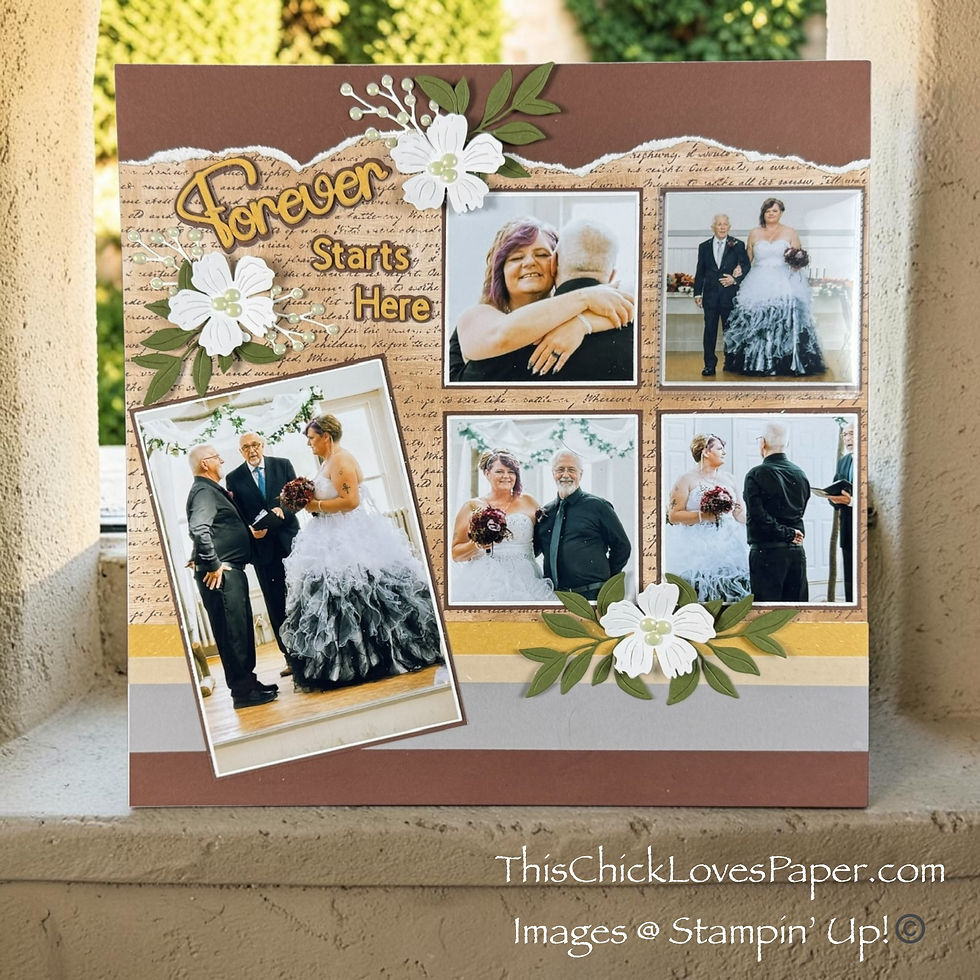
On this layout, the title sits above the 4” x 6” hero photo on the left-hand page — slightly angled, layered over the script background, and grounded by that widened gold strip.
And that placement matters.
Because with a photo-heavy wedding scrapbook layout, the title becomes the visual anchor. It pulls your eye to the top left first, sets the tone, and balances the weight of the photo grid across the spread.
The letters were cut from Golden Glow Two-Tone 12"x12" Cardstock, which just so happens to match the Natural Hues textured gold strip perfectly. That repetition of gold creates cohesion without adding another competing color.
Instead of making the title oversized, I let the color and angle do the work.
It’s subtle.
It’s intentional.
And it gives the entire layout a starting point.
💡 Pro Tip: On high photo count layouts, place your title before embellishments. It establishes the visual triangle and keeps your clusters from competing with your words.
STEP FIVE: Show a Little Restraint (Yes, Really)

If you know me, you know I can get a little heavy-handed with embellishment clusters. Two flowers. Sometimes three. I don’t play small. 😅
But on this layout? I had to show some restraint. With 19 ceremony photos already doing the talking, the clusters needed to support the story — not compete with it.
So instead of multiple flowers in each cluster, I settled on one. Just one focal flower per cluster, layered with Mossy Meadow leaves from the Help Me Grow dies and sprigs from the Stampin’ Up! Poinsettia Petals bundle.

The Antique Pearls finish it off and instantly give that soft wedding bouquet feel — even though we’re working with Nature’s Walk DSP.
It’s subtle.
It’s balanced.
And it still feels bridal.
Each flower petal has a tiny piece of foam tape under it for gentle dimension, and each Antique Pearl has a dot of glue reinforcement. This album is going to be handled and loved — nothing is lifting on my watch.
💡 Pro Tip: When your layout is photo-heavy, scale back your clusters. Let the embellishments frame the moment, not steal it.
STEP SIX: Move the Journaling (On Purpose)

The original Creative Design Team sketch placed the journaling underneath the far-right photo.
And I tried it.
But here’s the problem — not enough room for everything the Groom wanted to say!
Earlier, I mentioned that I adjusted the measurements from the original sketch. I made the gold strip slightly wider and extended the vellum layer.
That wasn’t accidental.

It gave me a clean, readable landing spot for the journaling on the right-hand page — underneath the photo grid instead of squeezed under that single image.
The journaling itself was printed on an Avery label and adhered directly over the gold and vellum strips. The vellum softens the contrast, and the wider gold strip ensures the words don’t compete with the patterned script.
It also balances the weight of the left-hand page beautifully.
What started as a small measurement tweak turned into one of my favorite design
adjustments on this layout.
💡 Pro Tip: If a sketch placement doesn’t serve readability, adjust it. Your words matter just as much as your photos.
(*As an Amazon Associate, I earn from qualifying purchases.)
🤎 Proof That Photo-Heavy Can Still Be Pretty

When you step back and look at this finished 12x12 wedding scrapbook layout, it’s almost funny that it holds 19 ceremony photos. Because it doesn’t feel crowded. It doesn’t feel chaotic. And it definitely doesn’t feel like we “made it work.” It works.
The Creative Design Team Sketchbook Volume 5 gave us the structure. The widened strips gave us breathing room. The flip flaps gave us capacity. And the softened clusters kept it elegant.
The couple stays front and center.
The guests are still included.
The story stays intact.
This is layout number four in the wedding album series — and it proves you don’t have to sacrifice size for quantity or quantity for beauty. You can have both.
And honestly? That’s the whole point.
✨ More Pages, More Possibilities
If this ceremony layout sparked something for you, there’s plenty more where that came from.
This wedding album series continues with cake moments, outdoor portraits, and sentimental details — but you’ll also find birthday spreads, seasonal layouts, and everyday memory pages throughout the blog.
Because at the end of the day, this isn’t just about weddings. It’s about telling stories beautifully — whether that’s “I do” or Taco Tuesday.
Scroll through the gallery below and see what speaks to you next. 💛

Outdoor Wedding Scrapbook Layout Using Nature’s Walk DSP | Jayma Malme & Friends Collab (CDT Sketchb 
Now Showing: A Hollywood Land Disney Scrapbook Layout That Deserves a Standing Ovation! 
🌼 A Bug’s Life | A Whimsical Disney-Inspired Scrapbook Layout Tutorial 
🍪 “Fat Girl Wanted Cookies”! A 12x12 Cookie-Themed Scrapbook Layout That’s Good to the Last Crumb! 
🍰A Slice of Forever — Wedding Scrapbook Layout Idea for Cake-Cutting Moments 🍰💛✨ 
Cookies, Cocoa & Christmas Cheer: A Cozy 12x12 Christmas Cookies and Cocoa Scrapbook Layout 
🌲⛺️Roughing It Never Looked So Good! 12x12 Camping Scrapbook Layout Using Weekend Adventures DSP 
This Is Halloween – A Disney Haunted Mansion Inspired Scrapbook Layout Full of Tricks, Treats, and T 
Friends & Family Wedding Scrapbook Layout Using Nature’s Walk DSP | Jayma Malme & Friends Collab (CD
💌 Your Story Deserves a Spotlight Too

Maybe you use this exact Creative Design Team sketch for a wedding album.
Maybe you turn it into a graduation layout, a travel spread, or a memory page packed with everyday moments.
Maybe you already own the Help Me Grow dies, Secret Garden flowers, or a stash of Antique Pearls and just needed a fresh way to use them.
However you interpret it, I’d love to see what you create.
Share your finished layout in the Members Gallery so others can be inspired, encouraged, and reminded that there’s no one “right” way to tell a story. That’s the beauty of this community — we learn from each other. And I can’t wait to see what you do with it. 🤎
💍 Where Big Moments Find Their Place

Nineteen ceremony photos—one 12x12 scrapbook layout. And not a single moment lost in the shuffle.
What started as a Creative Design Team sketch became something personal — widened strips, softened florals, hidden flip flaps, and a whole lot of intention.
The couple stays front and center. The guests are still part of the story. The page feels balanced, elegant, and complete.
And that’s really what this wedding album is about. Not just fitting photos.
But giving every memory the place it deserves.
Now… slide that trimmer back onto the counter and start building your next page. 🤎
April - This Chick Loves Paper
🛒 Grab Your Supplies & Get Crafting!

All photos and projects are subject to copyright © ThisChickLovesPaper.com.
Images © Stampin’ Up!® & CTMH®.
The content in this blog is the sole responsibility of April Raine – This Chick Loves Paper, Independent Stampin’ Up!® Demonstrator.
The use of and content of classes, services, or products offered is not endorsed by Stampin’ Up!®.
Wedding scrapbook layout with 19 ceremony photos on one 12x12 double page. Step-by-step Creative Design Team sketch tutorial featuring flip flaps, Nature’s Walk DSP & dimensional florals — created by This Chick Loves Paper.

⭐How I Protect My DSP, Cardstock & Finished Cards
*As an Amazon Associate, I earn from qualifying purchases.
I store my DSP, cardstock, scraps, and even finished cards in these clear resealable bags.
The 2-mil thickness is perfect for everyday crafting (they make a 4-mil option if you want extra durability!), and they’re tough, reusable, and great for keeping your entire crafting stash clean, tidy, and protected from the chaos of the craft room.
• 13×13 Plymor 2mil Zipper Reclosable Bags — for 12×12 DSP, cardstock sheets & scraps
• 9×12 Plymor 2mil Zipper Reclosable Bags — for 8.5×11 cardstock & scraps
• 6x8 Plymor 4mil Heavy Duty Reclosable Bags — for storing extra die cut embellishments & finished cards, card workshop kits


Comments